CHEF
The platform

Everything CHEF does.

The complete kitchen platform, on one record. Each section says what the module does, why it matters on a busy shift, and whether it's built today or still on the way.

Orders

Kitchen display

The screen every ticket goes to.

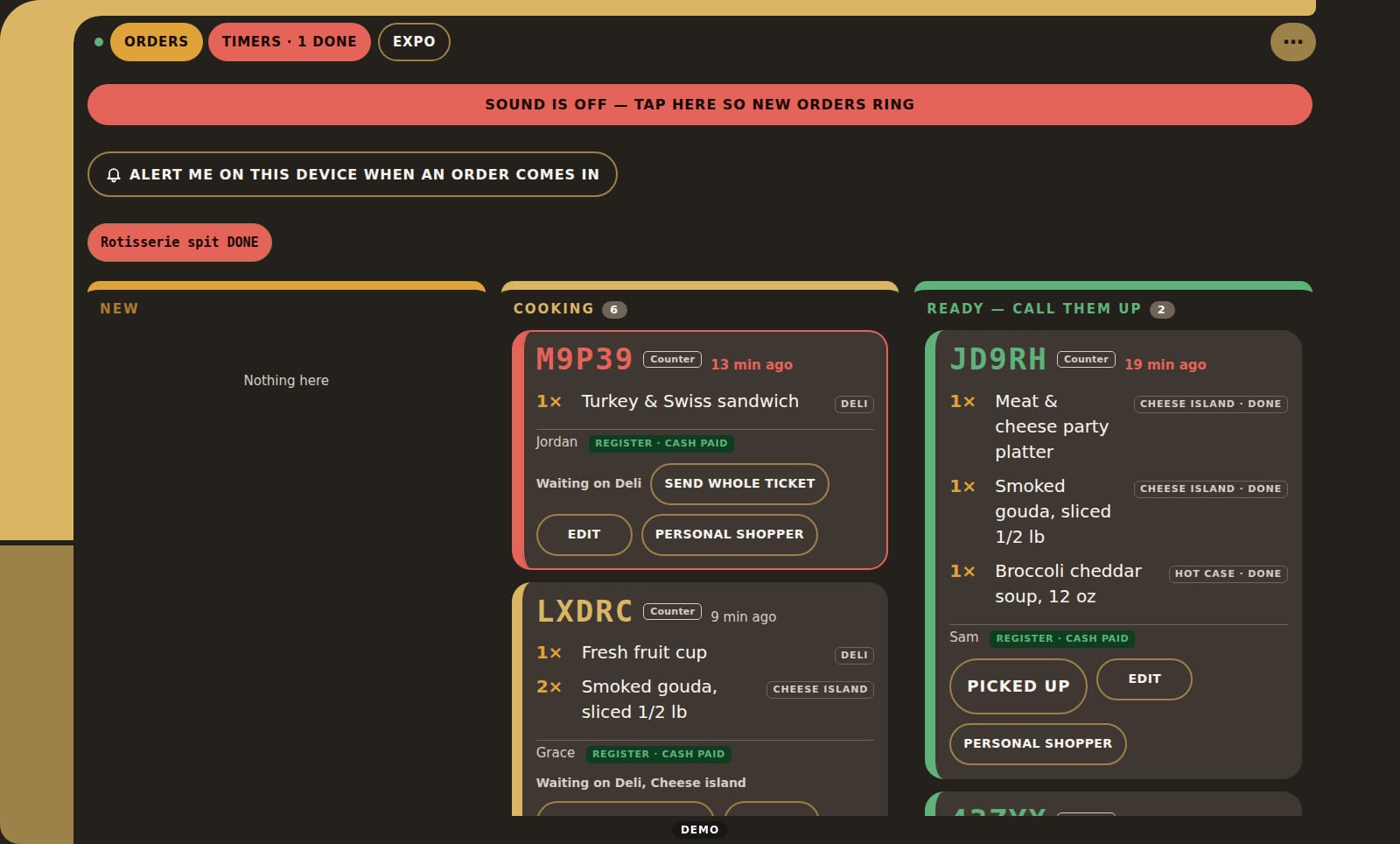
BuiltThe CHEF kitchen display with cooking and ready lanesCHEF screen, sample data
  • New, Cooking and Ready lanes side by side, each scrolling on its own; a tap moves a ticket along.
  • Each ticket shows where it came from (counter, kiosk, online, catering or internal) and how long it has waited. Late tickets are marked.
  • Stations: expo sees every item, prep stations see only their own, and anything not mapped to a station falls back to expo so nothing goes missing.
  • Shared timers with a target temperature, kept on the server clock so every screen counts the same time, in °F or °C.
  • A chime and vibration on a new order; the screen sleeps when it's quiet and wakes when an order arrives.
  • Installs to the home screen and runs full screen, and can be locked as a kiosk on Android or iPad with no app store and no device management.

Why it matters: when every channel lands in one queue, the line cooks to one list, and a ticket can't sit on a tablet nobody is watching.
See the full page

Orders

Ordering kiosk

Order now, pay at the front.

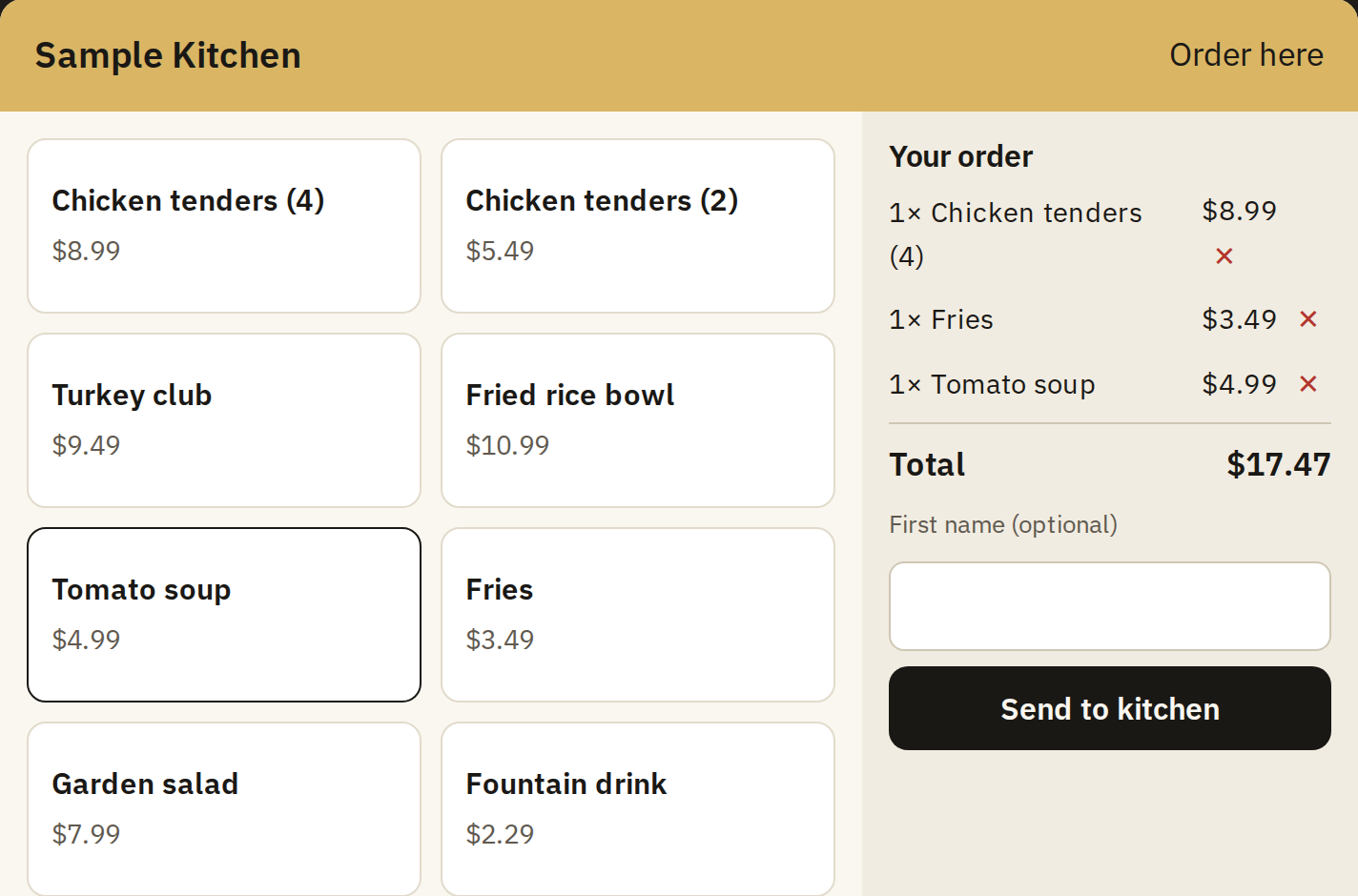
BuiltThe CHEF ordering kiosk with a menu and an orderCHEF screen, sample data
  • Guests build their order on an in-store touch screen and get a ticket number to take to the register.
  • The ticket goes straight to the kitchen display, clearly marked pay-at-front, so the kitchen can start while the guest pays.
  • No money moves on the kiosk, so there's no card reader to buy, certify or secure.
  • Only a registered kiosk device can create these tickets. Each one has its own secret and can be revoked on its own.
  • Staff leave the locked kiosk with a held corner and a PIN; five wrong tries lock it for five minutes.

Why it matters: the counter line moves while the kitchen is already cooking, and the register stays the one place money is taken.

See the full page

Orders

Online and counter orders

Card-first, so the kitchen only cooks what's paid for.

Built
  • Online orders: the card is authorized at checkout and captured when the kitchen accepts. If nobody accepts, the hold is released and the guest pays nothing.
  • The money goes to the kitchen's own Square or Stripe account. CHEF never holds it and takes no cut of the sale.
  • Square kitchens can keep their menu and prices in Square; CHEF follows it.
  • Counter ring-in on the same screen, with only an optional first name. No phone number or email is asked for.
  • A wait estimate ("about 8 min") from the kitchen's own recent prep times and the tickets ahead. With too little history, it shows no number rather than a guess.
  • Guests can follow their order and get a chime when it's ready, even after reloading the page.

Why it matters: an unpaid order never reaches the kitchen, and the kitchen never chases a refund for food it didn't cook.

See the full page

Kitchen

Production runs

Make 30 of something, safely.

Built Run screens: coming
  • A lead starts a run from a recipe and a target quantity. CHEF scales the ingredients and keeps a snapshot of the recipe as it was made.
  • Crew will join the run from their phones with a QR code and their PIN, and scan what they pull. The run screens are being finished.
  • A danger-zone clock tracks how long temperature-sensitive items have been out, and keeps running until someone logs them back to cold storage with a passing temperature.
  • When the run is done, CHEF records the yield and where the output went.

Why it matters: the time food spends out of temperature is measured instead of estimated, and a forgotten tray doesn't stop the clock.

See the full page

Prep

Recipe cards and package labels

The recipe and the label, at the station where the food is made.

Built Not yet tested on a real label printer
  • Recipe cards sit on the kitchen screen, grouped by station, with ingredients, steps, yield and shelf life.
  • Scale a card by half, one, two, three or four batches. Times and temperatures stay as written, and the card says so.
  • A card prints the sticker for a wrapped item, using the kitchen's own ingredient statement. CHEF never writes that legal text for you, and never says a label is free of an allergen.
  • Zebra label printers are driven from the store's own server over the store network, so nothing connects in from outside.

Why it matters: the cook reads, scales and prints at the station, not at an office computer upstairs.

See the full page

Kitchen

Hot-hold

Know what's in the steam table without looking.

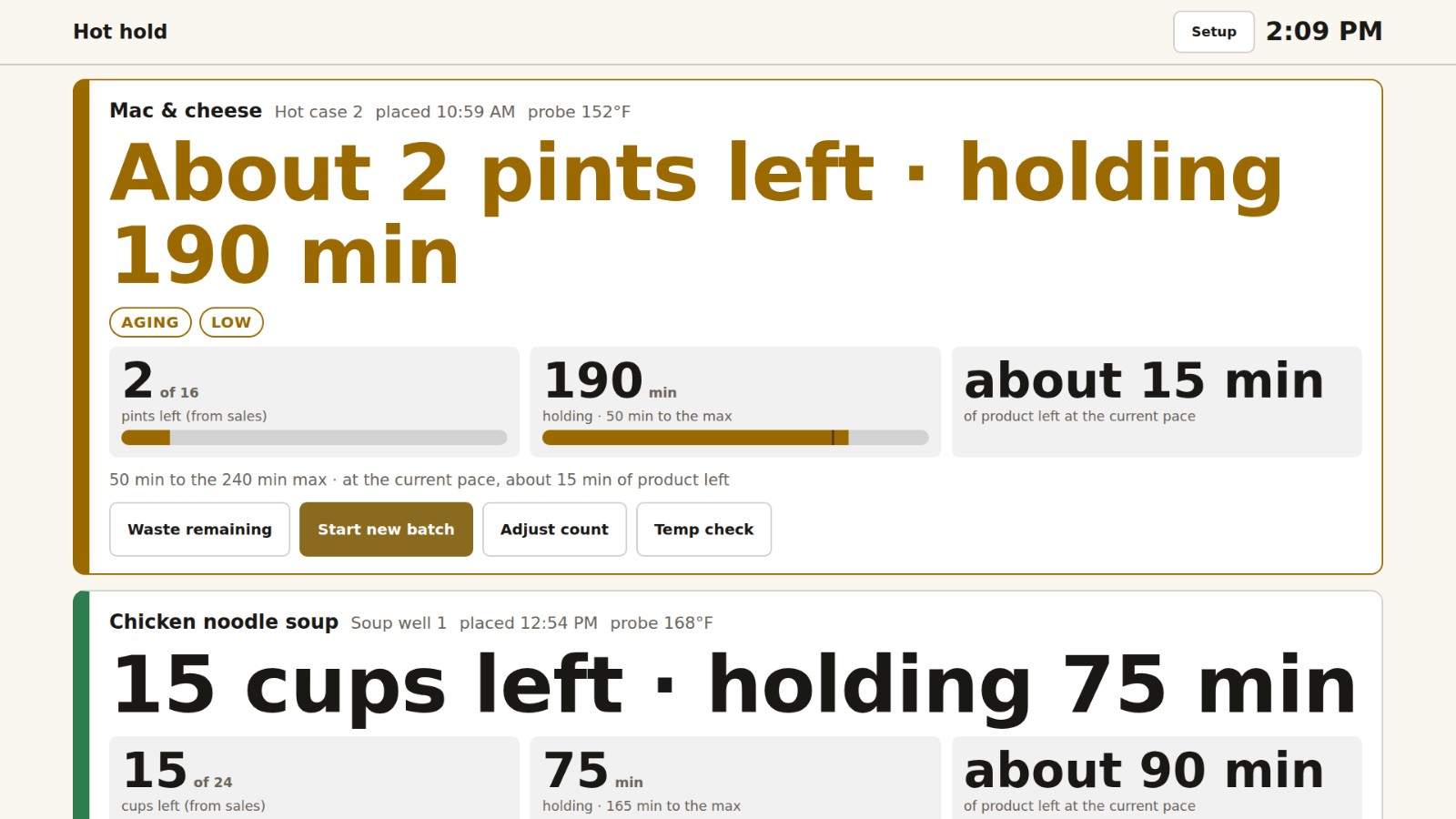
BuiltCHEF hot-hold manager screen showing pints left and minutes heldCHEF screen, sample data
  • Probe a batch, place it, and set the count (10 tenders, say). Each sale rung in draws it down by the right amount, so a box of 4 takes 4.
  • The manager's large screen shows "About 2 tenders left · holding 47 min", with LOW and AGING tags.
  • A placement probe below the configured minimum is refused. Past the hold limit, the batch shows as expired.
  • Waste and replace in one step. The waste is logged and, if linked, costed against inventory.
  • Limits are copied into each batch when it's placed, so changing a setting later never rewrites a batch already on the line.

Why it matters: the next batch goes in before the line runs dry, and food that has held too long is caught on the screen instead of by a guest.

See the full page

Kitchen

Food-safety log and checklists

The record an inspector asks for, kept as you work.

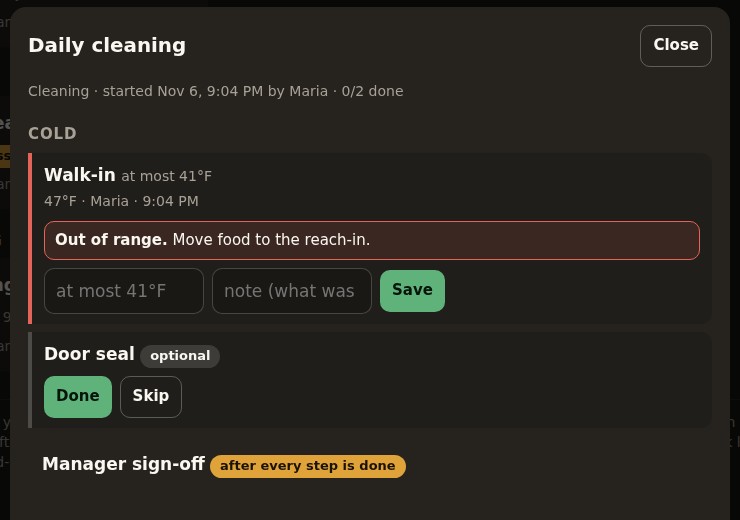
BuiltA CHEF checklist flagging an out-of-range walk-in temperatureCHEF screen, sample data
  • Temperature, receiving, sanitizer and corrective-action entries, plus two-stage cooling logs, each with who and when.
  • Readings below target, missing or late are flagged. The log prints for an inspector.
  • Opening, closing and custom checklists with yes/no, reading, number and text steps. Out-of-range answers are flagged.
  • Handheld probe readings can be recorded in one tap into the record they belong to: a cooling stage, a hot-hold re-temp or a fryer check.
  • Hot-hold, probe and equipment limits are the kitchen's own settings, confirmed by an owner from its food-safety plan. The log's other checks start from standard values, and owner-set limits for those are coming.

Why it matters: the binder on the wall becomes a searchable record that can't be filled in after the fact.

See the full page

Kitchen

Custom checklists and workflows

Write your own routines; the crew run them.

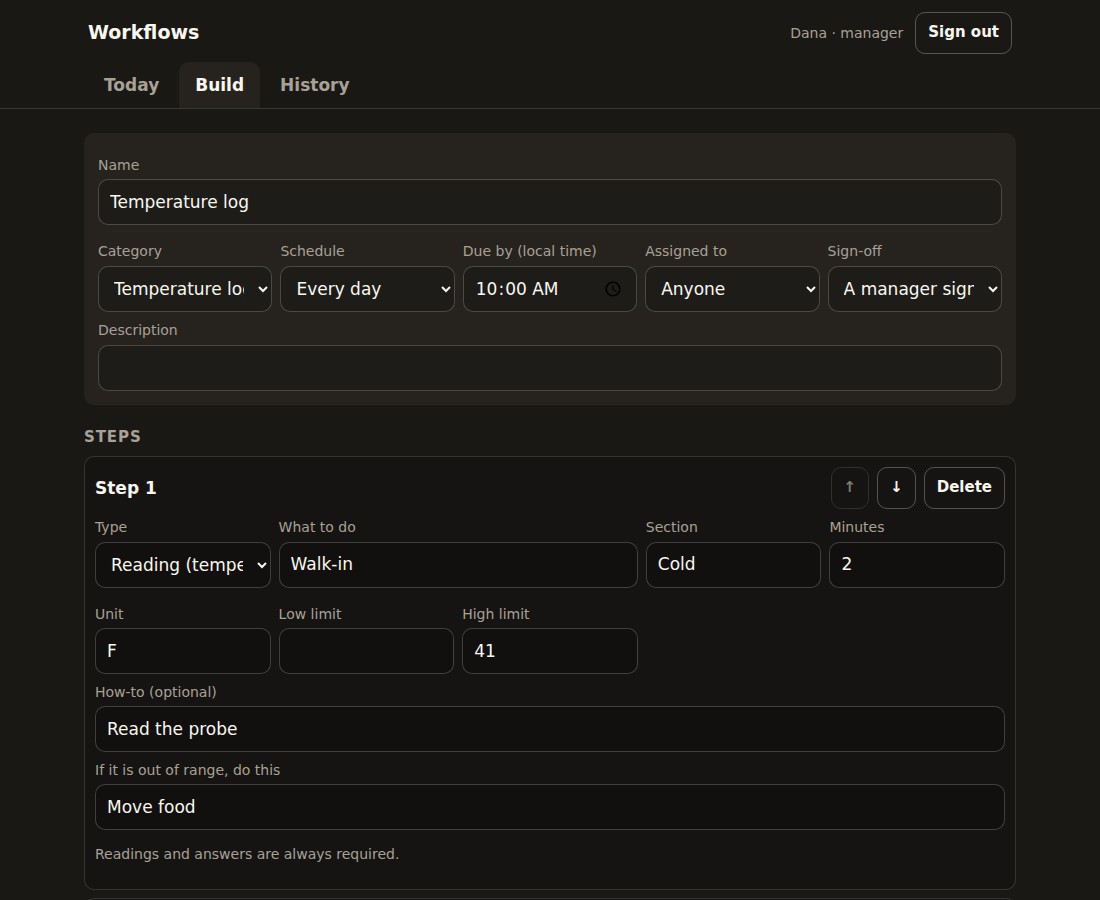
BuiltBuilding a temperature-log workflow in CHEFCHEF screen, sample data
  • Build your own templates for opening, closing, line checks, receiving, cleaning or anything else your kitchen does.
  • Four kinds of step: a check (done, or skipped with a note), a reading with a unit and an allowed range, a typed answer, and a link to work done on another screen such as the stock count.
  • Crew sign once with their PIN; each step records who and when, on the server's clock.
  • An out-of-range reading is flagged, and the step stays open until it has a note about what was done or a reading back in range.
  • A run copies its steps when it starts, so editing a template never rewrites a past record.
  • Steps become tasks you can hand out by QR code, as one-offs or recurring every day or weekday.
  • A workflow builder: steps, sections, limits, what to do when a reading is out of range, who it's assigned to, when it's due, and manager sign-off.

Why it matters: the way your kitchen already works becomes the system, instead of the system dictating how your kitchen works.

See the full page

Back of house

Inventory and costing

What you have, and what each plate costs.

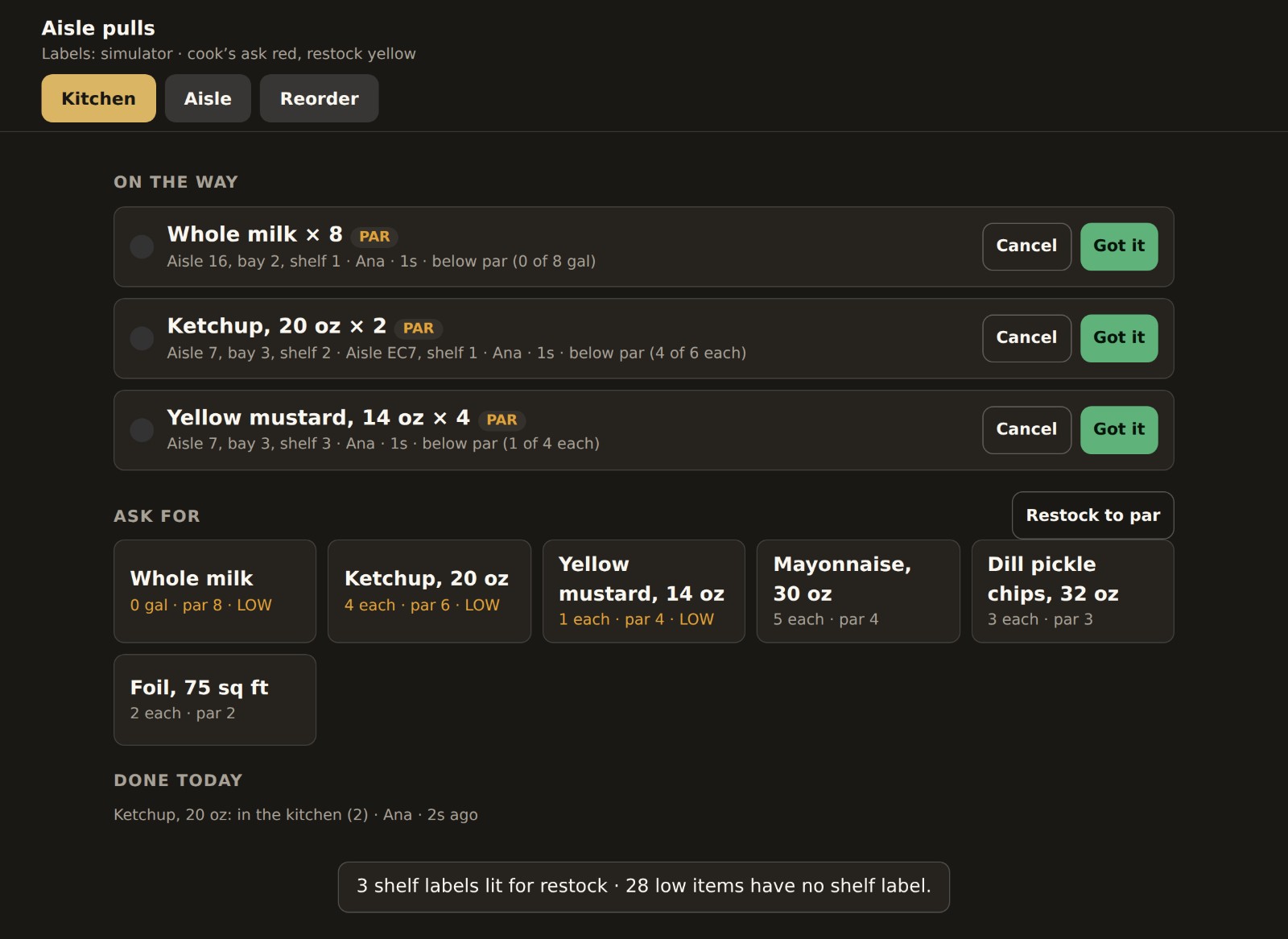
BuiltCHEF shelf-label pulls with par levelsCHEF screen, sample data
  • Par levels and live on-hand: the last count, plus every sale, delivery and waste since.
  • End-of-shift counts as a team: phones join with a short code, everyone counts at once, and the screen shows the combined count live.
  • Waste, spoil and comps are logged with a reason when they happen.
  • Receiving by the case, turned into per-unit cost. A photo of a supplier receipt is read by a local model, and nothing reaches stock until a person confirms each line.
  • Plate cost and food-cost percentage for each menu item, from its recipe. When an ingredient price pushes an item over target, CHEF suggests a new price for the owner to approve.
  • Usage against recipe, flagged when it runs over two counts in a row.
  • Shelf labels: a cook taps an item, its electronic shelf label flashes so a runner goes straight to it, and stock goes up when it arrives. Labels show par levels, and CHEF proposes the reorder from pars and usage.

Why it matters: a supplier price increase shows up on the menu price before it shows up on the P&L.

See the full pageShelf labels

Back of house

Prime cost, live

Labor plus food, for the day so far.

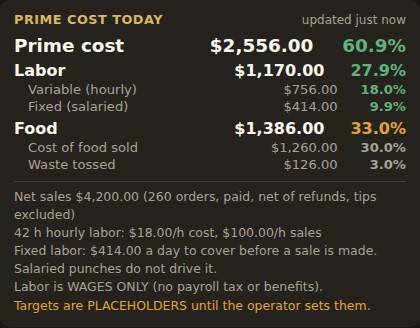
Built Manager screen: nextCHEF prime cost for today, labor and foodCHEF screen, sample data
  • Hourly labor from the crew clock at each person's rate, plus salaried managers spread across the days the site is open.
  • Food cost from what sold and what was wasted, against the day's sales.
  • The operating day follows the site's own time zone and start time, so a 1 a.m. close stays on the right day.
  • Every figure comes with its inputs. Someone on the clock with no rate is called out ("1 person has no wage rate"), never counted as $0.

Why it matters: a manager can see the day running hot at 2 p.m. and adjust the evening, instead of finding out from the monthly report.

See the full page

Back of house

Catering and special events

From request to quoted-versus-actual.

Built
  • Requests come in from the kitchen's own public form or are typed in by a manager. Nothing is priced, booked or cooked from a request on its own.
  • Menu lines by fixed quantity or per guest, custom lines such as rentals, and labor by position, people and hours.
  • Every quote shows its food, labor and prime cost against the kitchen's targets. A line with no recipe or no ingredient cost shows as unknown, never $0.
  • Quotes are versioned. The customer copy shows lines, fees, total and deposit, never cost or margin.
  • A calendar with daily limits, production scaled from the event, and a review after the event comparing what was quoted with what happened.

Why it matters: an event is priced from what the food and labor really cost, and the kitchen can see whether it made money on it.

See the full page

People

Crew clock

Punch in from any CHEF screen.

Built
  • Crew clock in and out with a PIN, at a location and in a position. Crew belong to the business, so one PIN works at every site.
  • Punches are never edited. A correction is a new entry with an audit trail.
  • Hours roll up for the owner and export as CSV for payroll. CHEF is not a payroll system.
  • Five wrong PINs lock that location's clock for five minutes.

Why it matters: labor cost and "who's on right now" come from the same punches, with no separate time-clock hardware.

See the full page

People

Task board

Hand out the work by QR code.

Built
  • The lead shows a QR code; crew scan it and join with their PIN.
  • Tasks come from checklist steps, one-off jobs or daily recurring templates, with a station, a due time and a priority.
  • Assign one by one, split evenly, or leave a task open for whoever takes it first.
  • Finishing a checklist task writes to the checklist record, so there's one source of truth.

Why it matters: everyone knows what's theirs, and the lead sees what's slipping without walking the kitchen.

See the full page

People

Manager override

Short, logged approvals at the station.

Built (PIN) Phone passkey: planned
  • Hold the top-left corner of any CHEF screen to sign in. A manager on duty can open a short approval window, two minutes by default, and end it with one tap.
  • Covers voiding or reopening a ticket, wasting and replacing a hot-hold batch, adjusting a count, and acknowledging a critical alert. Changing a configured limit takes the owner's PIN. Most need a reason.
  • An override vouches for a person; it never switches off a guard. An unpaid ticket is still unpaid and a cold batch is still refused.
  • Every use is logged, and the log is visible to managers on duty.
  • Managers use their PIN today. The design takes stronger credentials, and a passkey on the manager's own phone is planned.

Why it matters: the shift doesn't stop for a manager to walk over, and every exception has a name and a reason on it.

See the full page

Intelligence

Ask CHEF

Questions about the shift, answered from your records.

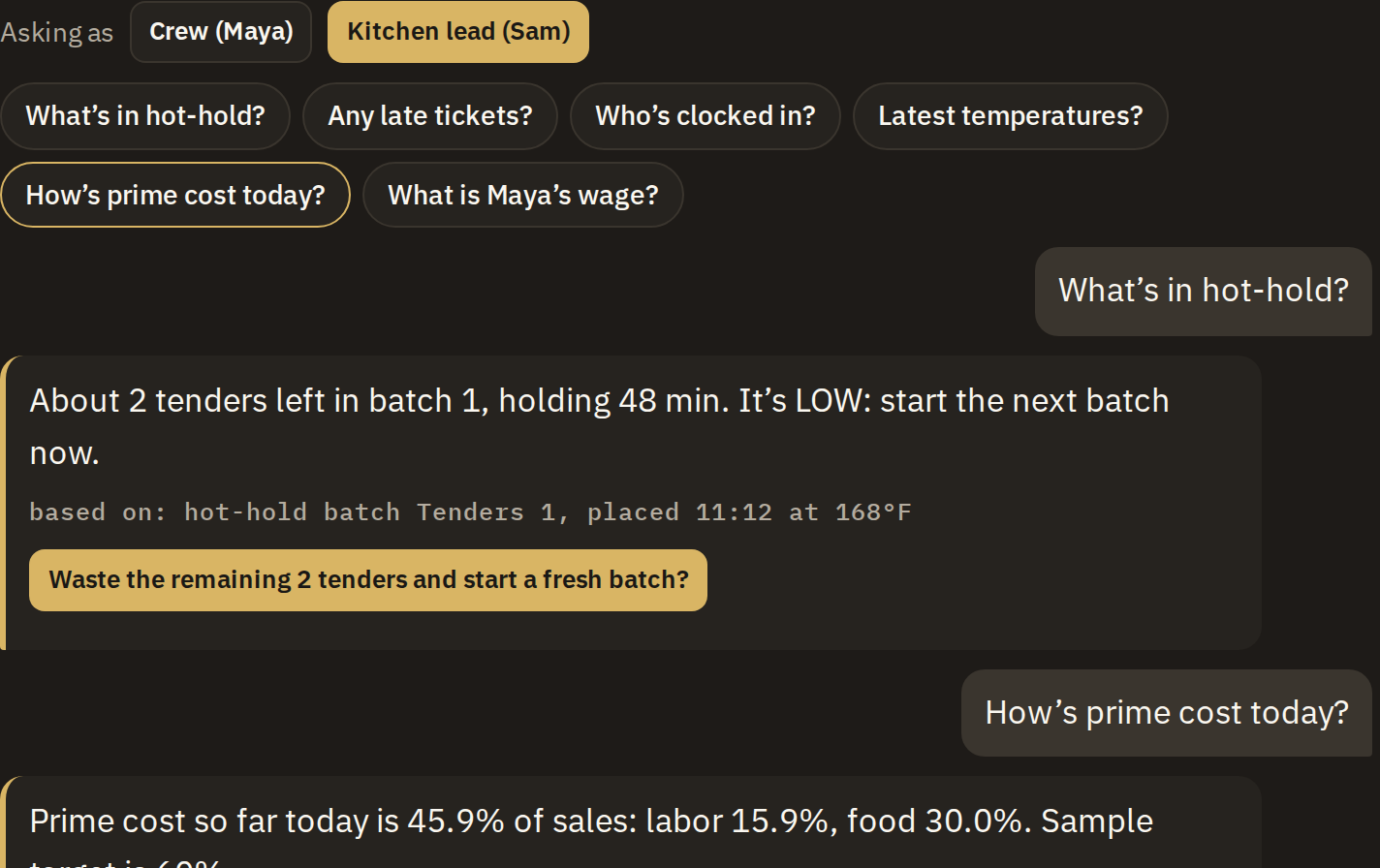
BuiltAsk CHEF answering questions about the shiftCHEF screen, sample data
  • Press and hold the bottom-right corner of a screen and ask: "What's in hot-hold?", "Any open corrective actions?", "Who's clocked in?", "How's prime cost today?"
  • Short, practical answers, each with what it was based on ("based on: hot-hold batch Tenders 1, 12:04").
  • Two levels: crew, and the kitchen lead. A question above your level gets "That's for the kitchen lead," and the data isn't even read.
  • It can't see wages, salaries, PINs, keys or guest contact details. Those are left out before anything reaches the model, and tests check it.
  • It never acts on its own. It can offer a button ("Waste the remaining 2 tenders?"), and only the person's own tap and confirm runs it.
  • Runs on a model the kitchen chooses, including one on its own server. If none is connected, it says so instead of making something up.

Why it matters: a new lead can get an answer in seconds without knowing which screen holds it, and the kitchen's data stays the kitchen's.

See the full page

Intelligence

The bridge

One list of what needs attention now.

Built
  • Pulls hot-hold, food safety, staffing, labor, food cost, upcoming orders, and devices into one prioritized list.
  • Critical items can be acknowledged by a manager. Acknowledging records who saw it; it doesn't make the problem go away.
  • A source that can't be read shows as a warning, never as all-clear.
  • New paid orders reach the kitchen by push notification, or by email if no device is listening, so an order isn't missed because a screen was asleep.

Why it matters: the manager watches one list instead of six screens.

See the full page

Screens

Boards and signage

The right information on the right wall.

Built Not yet run on a signage player
  • A guest board with ticket number, first name (or ticket only, by site), Preparing or Ready, and a wait estimate that only counts down.
  • Crew boards: who's on, the queue and its age, late tickets, running timers, open checklist steps, labor, food cost, food safety and upcoming orders.
  • Staff schedule and announcements boards.
  • Guest and crew feeds use separate keys, and the guest feed carries no crew, money or contact details.
  • Built for Xibo digital signage players or any browser screen.

Why it matters: guests stop asking "is mine ready?", and the crew see the state of the shift at a glance.

See the full page

Hardware

Printing and labels

Paper where paper still helps.

Built Not yet tested on a real printer
  • Kitchen tickets, pay-at-register tickets, prep lists, hot-hold and day labels, prep labels, food-safety sheets, work orders, waste slips, receiving checklists and the end-of-day summary.
  • Built for Star CloudPRNT and Epson Server Direct Print. The printer collects its jobs, so nothing reaches into your network.
  • Retries, paper-out handling, one automatic print per item and clearly marked reprints.

Why it matters: labels and sheets come from the same record as the screens, so the paper matches what happened.

See the full page

Hardware

Equipment monitoring

Coolers, freezers and fryers on the record.

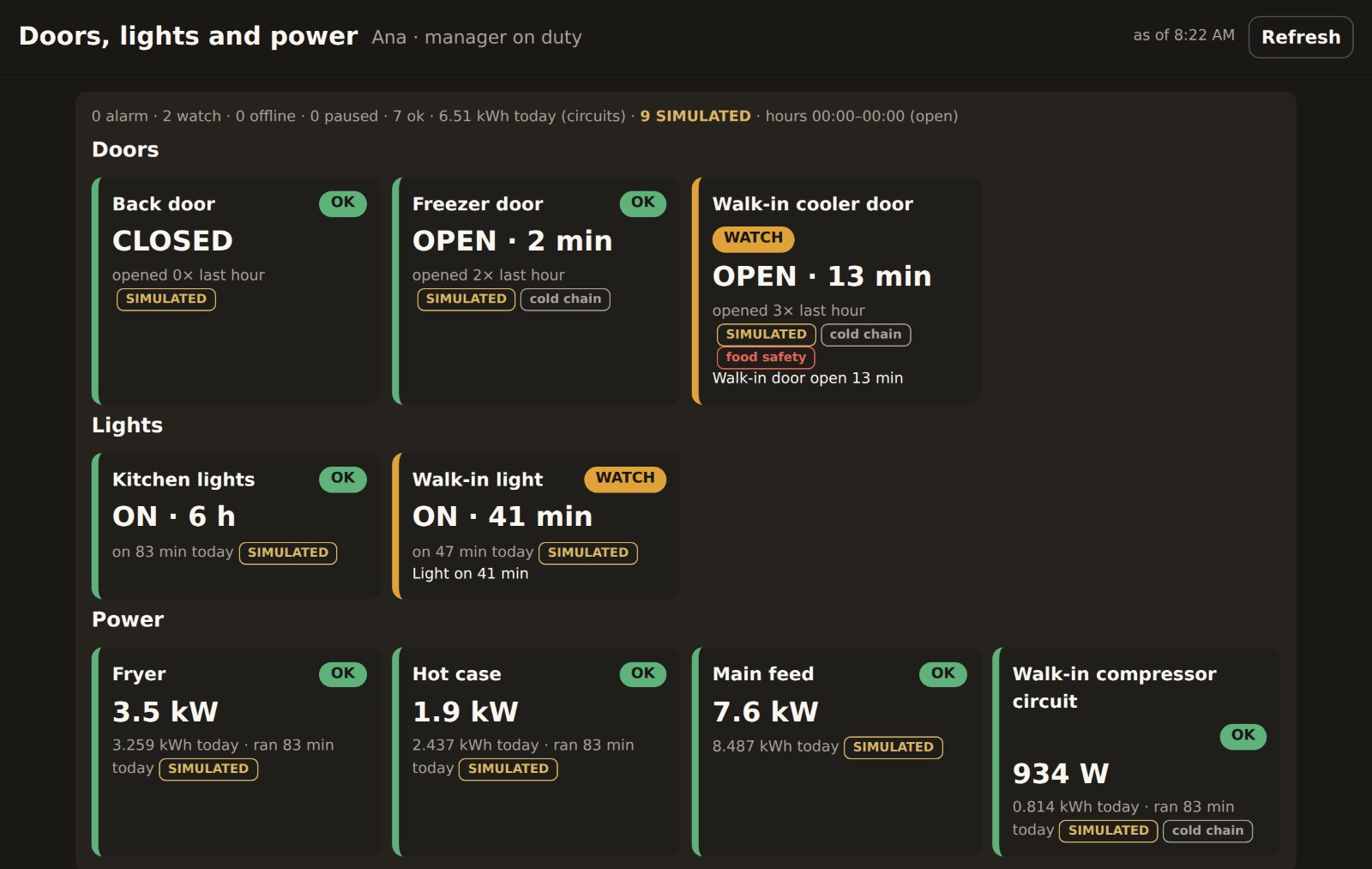
Built Tested with simulated sensorsCHEF doors, lights and power boardCHEF screen, sample data
  • Readings from manual checks, sensors and probes in one format, with defrost cycles kept out of the alarms.
  • Out-of-range readings and faults open a work order and a food-safety entry.
  • A unit that goes silent shows as offline rather than fine.
  • Doors, lights and power: which doors are open and for how long, how long the walk-in light has been on, and what each circuit draws, with suggested actions for a person to take.
  • CHEF only reads equipment. It never changes a setpoint.

Why it matters: a walk-in drifting warm overnight is a work order in the morning, not a lost delivery.

See the full pageDoors, lights and power

Deployment

Self-hosted, AI included

Your hardware, or hosted by us.

Built
  • One command installs CHEF on a Linux box in the kitchen or your data center, with Docker or without it.
  • The database, photos, backups, keys and the local AI model all live on that box. Running the kitchen doesn't need anyone else's cloud.
  • Ask CHEF runs on a local model: a larger one when an NVIDIA GPU is present, a smaller one on a regular CPU. Or point it at an AI service your company already runs, or switch it off.
  • A verified backup every day. Upgrades take a backup first and apply each database change once.
  • The kitchen's data stays on hardware the kitchen owns, and CHEF is licensed to run there.
  • Prefer not to run a server? Seven hosts CHEF for you, with the same features.

Why it matters: one platform covers the whole kitchen without handing the kitchen's records to someone else.

See the full page

Deployment

Seven, the managed backend

The service behind CHEF.

Optional
  • Seven is a blended intelligence, people and AI working together, that manages CHEF's software and hardware layer.
  • Installs CHEF, applies updates safely and checks the daily backups.
  • Watches the kitchen's screens, printers, probes, sensors and servers, and follows up when one goes quiet.
  • Runs and maintains the local AI model behind Ask CHEF.
  • Leaves recipes, prices, schedules and the kitchen's own food-safety settings to the kitchen.
  • CHEF is licensed to the kitchen, and Seven's care is optional: run CHEF yourselves, or let Seven look after it on your hardware or ours.

Why it matters: a kitchen gets a complete system without needing its own IT team to keep it running.

See the full page

What's next

On the roadmap

Planned, not running yet.

Planned
  • Order ahead: pre-paid, scheduled orders with pickup times and cutoffs, for bakeries and meal prep.
  • Tap to pay on the kitchen's own phone, with no card reader.
  • Phone passkeys for manager override.
  • Smart appliances: sending cooking programs from recipes to connected combi ovens such as the RATIONAL iCombi Pro, and recording what they cooked.
  • Recipe protection: controls that keep recipes from being copied out of the system. Recipe versioning is already built.
  • Wearables: a badge or wearable that signs crew in and clocks them in.
  • Door access: with cameras and access control such as UniFi, opening a locked door for crew on shift and logging every entry.

See the modules working together.

The demo runs the kiosk, kitchen display, hot-hold, crew clock, manager override and Ask CHEF on sample data, in your browser.