

Platform / Shelf labels
Shelf labels
The cook asks, the shelf lights up, the runner goes straight to it.
A cook needs ketchup. They tap Ketchup in CHEF, and the electronic shelf label for it flashes red in the aisle. A runner walks to the flashing label, takes the item, presses the label's button, and the label goes dark. Back in the kitchen, Got it closes the pull and stock goes up.
Pulls from the aisle
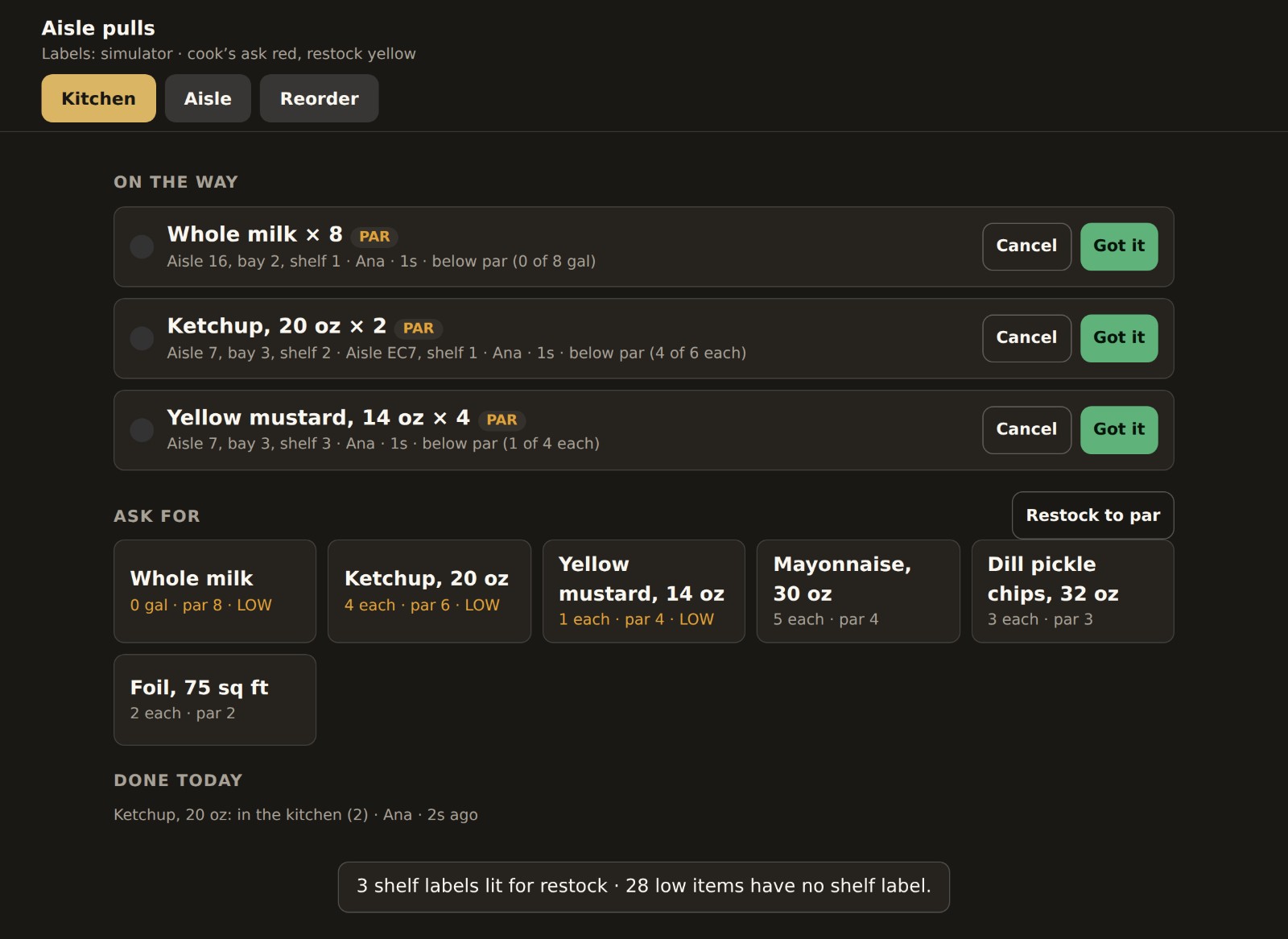
One open pull per item. If a second cook asks for ketchup, they join the first request. One trip, both names on it.
- The pull closes at the shelf from the label's button, a scan, or the aisle screen.
- Kitchen stock goes up only when Got it is tapped. Ketchup dropped on the way is not stock.
- Cancel turns the label off and leaves stock alone.
Pars and restock
Restock to par lights every labelled shelf whose item is below par, in a second colour, for the amount back to par in your usual pull size.
- Urgent asks flash fast red. Restocks flash slow yellow. The colours must differ so the aisle can tell them apart.
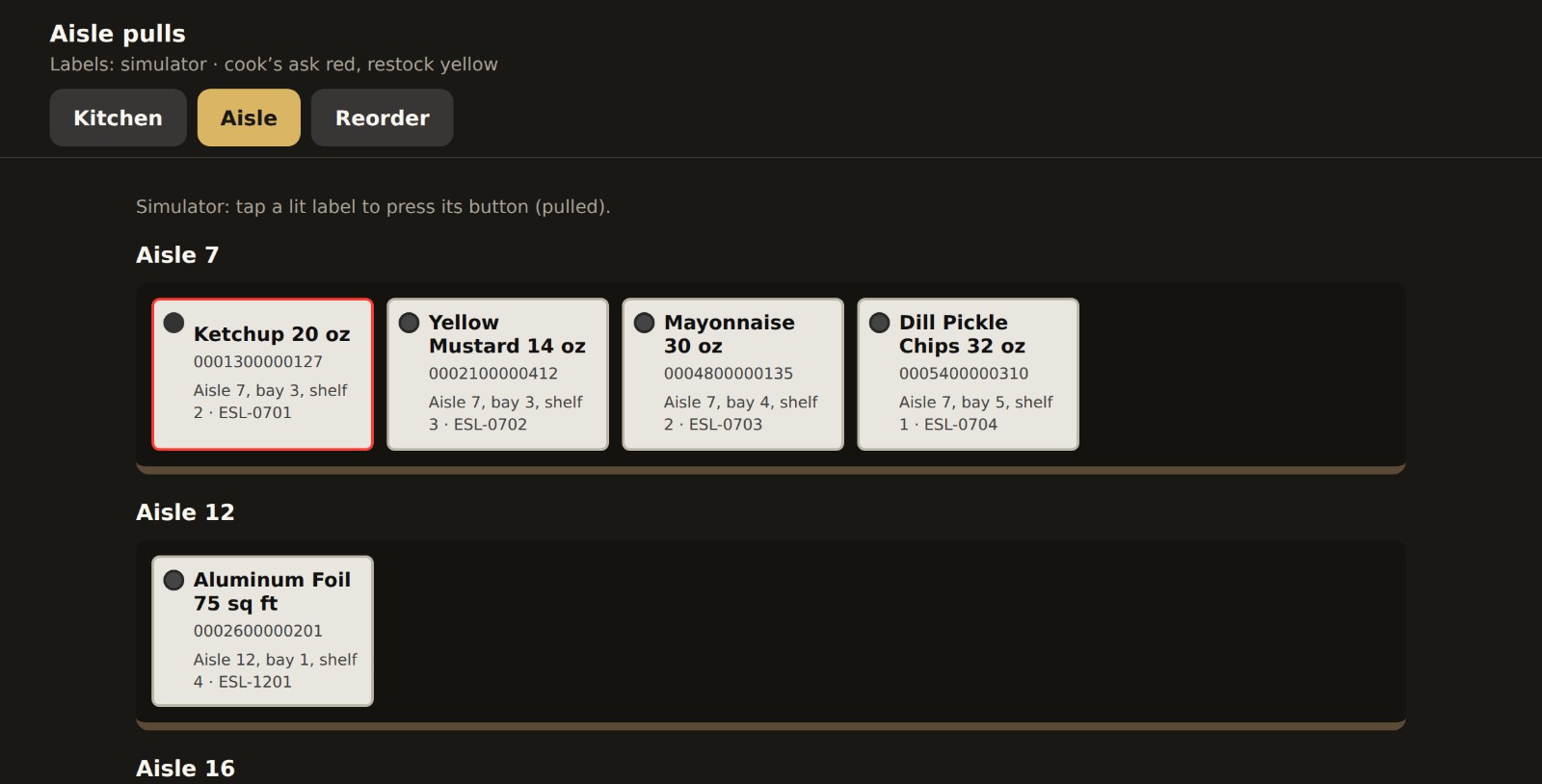
CHEF screen, sample data. Click to see it full size.
The reorder proposal
The Reorder tab works out what to order or pull from par, recent use, lead time, what's on hand and what's already on its way, rounded up to whole packs.
- Items that were never counted are held out and listed, because ordering to par from a guessed zero orders the whole par.
- It is a proposal only. Nothing is ordered until a person approves it.
Where it stands today
The full flow runs against a built-in label simulator, which draws the aisle on screen. A signed webhook can hand the same commands to a store's own label server.
- Direct connections to real label vendors are not enabled yet. The first planned target is SES-imagotag VUSION, which needs a pilot store's access before it is turned on.
- Other label brands are named in settings but not connected.
More screens
Real CHEF screens on sample data. Click any one to see it full size.
How it works
A cook taps an item on the kitchen screen. Every label for it flashes red, with a time limit.
A runner follows the flashing label, pulls the item and presses the label button. The label goes dark.
In the kitchen, someone taps Got it with the amount that arrived, and stock goes up.
Once a day, a lead opens Reorder, adjusts any line, and approves. Floor items light up for restock and supplier items become a draft order.
What you can change
Which shelves have labels
Put a label on a shelf or take it off, with the item it feeds, aisle, bay, shelf and the usual pull size.
Pars
Each item's par level drives Restock to par and the reorder proposal.
Floor or supplier, per item
Mark an item as pulled from the store floor or ordered from a supplier, with its lead time and how often it's reviewed.
Colours
Pick the urgent-request and restock colours from the label's LED palette. They must differ.
Flash length
Set how long a label flashes before it times out, from 10 seconds to an hour (10 minutes to start).
Label system
Choose the simulator or a signed webhook to your store's label server. Direct vendor connections are not enabled yet.
Rules CHEF holds to
Every flash ends
Labels run on batteries, so every flash has an end (10 minutes by default). A timed-out pull shows Light again.
Nobody walks to a dark aisle
If a label fails to light, the pull says so on the kitchen screen.
The page can't add an item
On approve, the proposal is recomputed on the server. A person can lower or zero a line but cannot slip in an item.
Drafts are never sent
Approved supplier lines become a draft order. Nothing goes to a supplier, and a draft counts as on its way for 3 days so approving twice doesn't order twice.
Coming
- Direct connection to SES-imagotag VUSION shelf labels (built but switched off until confirmed with a pilot store)
- Connections to other label brands
- Sending a draft order to a supplier by email or EDI, behind its own approval
- Supplier and case data per item
- Pars that suggest their own adjustment from usage, for a person to accept
- Feeding floor pulls back to the store's replenishment as transfers
Try CHEF in your browser
The demo runs on sample data, with nothing to install. Or write to [email protected] and tell us how your kitchen runs.