

Platform / Ask CHEF
Ask CHEF
Ask the kitchen's own records a question, and get a short answer with its receipts.
Press and hold the bottom-right corner of any CHEF screen for a second and ask a question. Ask CHEF reads a small set of your kitchen's records and answers in a sentence or three, the way someone would say it across the line. Every answer tells you what it was based on, so you can check it.
What it can read
Ask CHEF answers from a fixed list of read-only sources. If a question needs something outside that list, it says so and does not guess.
- Hot-hold batches and their warnings
- The temperature log and open corrective actions
- Checklists, open tasks and who is clocked in
- Upcoming and large orders
- Equipment, work orders, bridge alerts and printers
- For the kitchen lead: who is late, and today's cost totals
What it never sees
Some things are kept out at the data layer, so the model is never handed them in the first place. Tests plant these fields in every source and check they never reach the model or the log.
- Wage rates, salaries and per-hour labor cost
- Why anyone called out
- Customer phone numbers, emails and full names
- PINs, keys and secrets
- Last names. People come through as first names only.
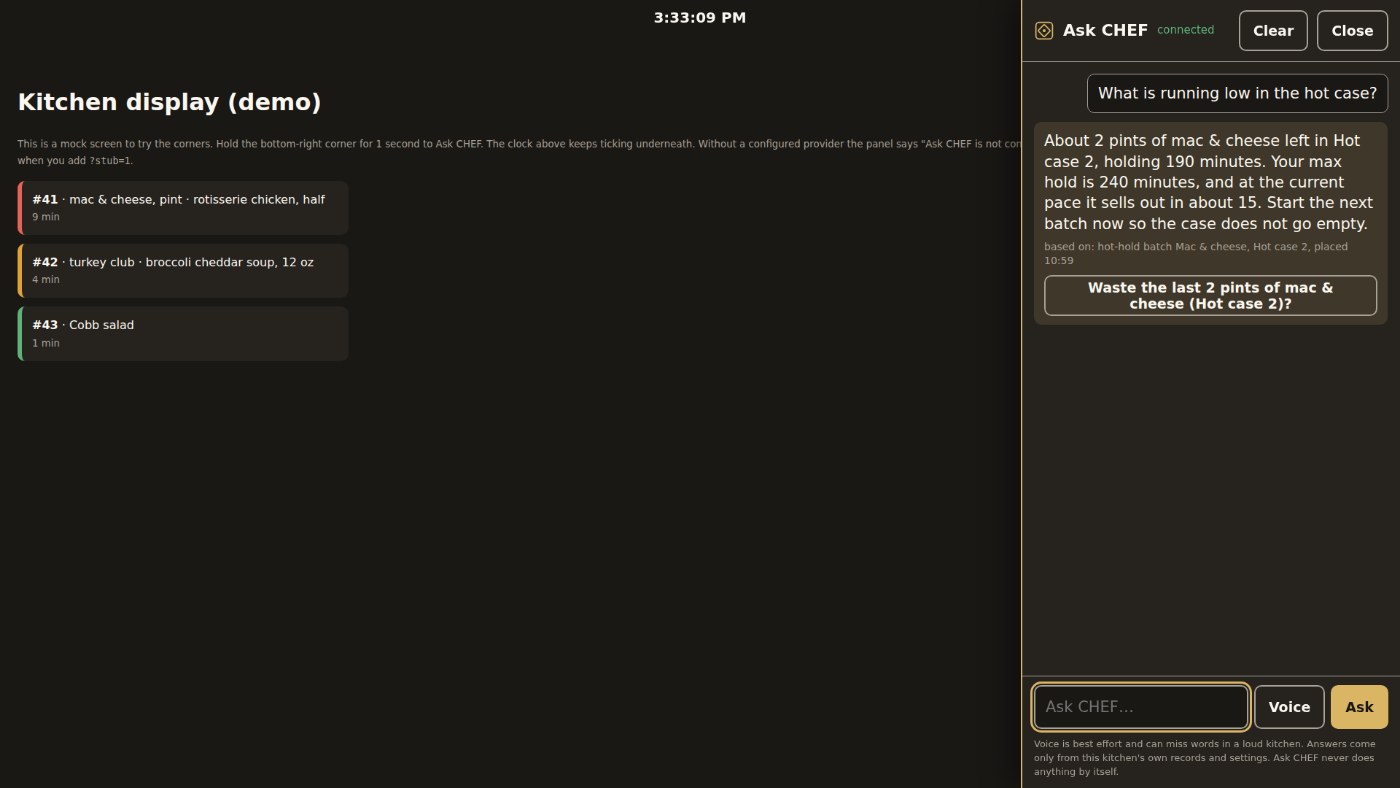
CHEF screen, sample data. Click to see it full size.
Two levels, set by who signed in
Crew get crew answers. Cost totals and lateness are for a manager on duty. If a cook asks a lead-level question, the answer is "That's for the kitchen lead," and the data is not even read.
Your model, your choice
By default Ask CHEF talks to a model server you point it at, such as a local one on the kitchen's own box. A hosted model is off unless the owner deliberately turns it on for that site, and that choice is recorded. With no model connected, it says "Ask CHEF is not connected" and stops there.
How it works
A cook holds the corner and asks: "How long has the second pan of tenders been up?"
CHEF matches the question to the hot-hold source and reads it. Nothing else is opened.
The answer comes back in plain words with "based on: hot-hold batch Tenders 2" underneath, and any time limit is quoted as your kitchen's setting.
If the batch has run past its limit, CHEF may offer a button to waste it. Nothing happens until the cook taps it and confirms, and then it runs through the same hot-hold screen and guards as always.
What you can change
Which model answers
Point Ask CHEF at any model server that speaks the common chat-completions format, such as a local one on your own box. You choose the address and the model.
Hosted model, on purpose
A hosted model can be switched on per site by the owner. It stays off until then, and the date the owner chose it is recorded.
On or off per site
Ask CHEF can be turned off for a site, or installed with no model at all.
How long the log is kept
The question log is cleared after 30 days by default. A site can set anywhere from 1 to 365 days.
Questions per person per hour
Each person can ask 30 questions an hour by default. A site can raise or lower that.
Who counts as a lead
Lead-level answers go to whoever is clocked in at a position you have marked as a manager.
Rules CHEF holds to
It never acts on its own
The model returns text and nothing else. Offered actions are built by code from the data, and run only on a person's own tap and confirm.
No legal limits stated as fact
Temperatures and times are quoted as your kitchen's settings. When a value is missing it says to check your HACCP plan or ask your manager.
Typed notes are treated as data
Names, notes and task titles are passed as quoted data with instructions to never follow them. The real protection is that sensitive fields are never in that data at all.
A lead-only log
Each question, answer and the list of sources read is logged for managers on duty. What the model was shown is never stored. The log clears after 30 days by default.
Honest when it cannot help
No model, a slow model or a question with no matching source gets a plain "not connected", "took too long" or "I can't see that". Never an invented answer.
Coming
- More one-tap offered actions. Today the only one is wasting an expired or too-cold hot-hold batch.
Try CHEF in your browser
The demo runs on sample data, with nothing to install. Or write to [email protected] and tell us how your kitchen runs.